Tuesday, 19 June 2018

Download iOS 11.4.1 Beta 3 without developer account


WHAT’S NEW IN IOS 11.4.1 BETA 3?

iOS 11.4.1 Beta 3 has a build number of 15G5072a and is already out for 43 devices. This version comes just one week after the release of the second beta of iOS 11.4.1.
Along with a beta for iOS, Apple also seeded tvOS 11.4.1 Beta 3 to developers.
This version is aimed mainly at fixing bugs and introducing performance improvements. Users have reported no new features thus far.
iOS 11.4
Users, however, did report standby issues on several iPad models in beta 2. Hopefully, this update will fix process management in idle state.
If you want to move to the latest beta, just grab and install the OTA Profile given below for a hands-free update.
For those of you want to go the iTunes route, download and save the necessary IPSW file locally on your computer (Windows or Mac).

IOS 11.4.1 BETA 3 DOWNLOADAlso Read:Fix Screenshot on Mac Not Working with 5 Methods

IPHONE

IPAD

IPOD

OTA PROFILE

SHOULD YOU UPDATE?

I wouldn’t recommend upgrading your device just now considering this version brings next to nothing to the table.
iOS 11.4.1 Beta 2 is already quite stable for a beta version so you should probably stay where you are.
Apple will probably seed the second beta of iOS 12 tomorrow or sometime during the next week. If you are a “beta enthusiast”, waiting a week or two will surely pay off in the end.
Sponsor Ads:
Gihosoft iPhone Data Recovery is a professional iPhone Data Recovery software to get back all your lost text message, photo, video, call history, note, contact and more from iPhone/iPad/iPod Touch. It offers a full solution to recover your lost data in different tough situations. Besides recovering data directly from iPhone, iPad and iPod touch, it also allows you to recover data from iCloud and iTunes backup files.

How to Recover Recently Deleted Photos in iOS 12


How to Recover Recently Deleted Photos in iOS 12


Accidentally deleted some photos and want to get them back? You can recover them all without any hassle.


Step #1. Open Photos app → Albums tab → scroll down and tap on the Recently Deleted album.


Step #2. Now, tap on Select at the top right → If you want to retrieve all the images, tap on Recover All. But if you wish to retrieve only a few photos, select them first. And then, tap on Recover.


That’s pretty much it!


Wrapping up:If you accidentally deleted or lost videos on iPhone, first please check on the Recently Deleted folder. Alternatively, you can use the professional tool Gihosoft iPhone Recovery to recover deleted iPhone videos from Camera Roll or some apps.


Photos app for iOS has got some neat features like “For You” tab and the ability to create a shared iCloud photo album. They might not be very attractive but they do seem to be on point. What do you think of these changes?Gihosoft iPhone Data Recovery is a professional iPhone Data Recovery software to get back all your lost text message, photo, video, call history, note, contact and more from iPhone/iPad/iPod Touch. It offers a full solution to recover your lost data in different tough situations. Besides recovering data directly from iPhone, iPad and iPod touch, it also allows you to recover data from iCloud and iTunes backup files.


Saturday, 16 June 2018

3 Easy Ways to Download/Save Tumblr Videos or Gifs on iPhone


Method 1: Download Tumblr Videos or Gifs Using Third-Party Tools

There are third-party tools available that can help you save your favorite Tumblr to your iPhone. One popular tool is DreDown. This method does not require you to have Jailbreak and will work on any iPhone. The only thing you need to do before you can use this method is connect your iPhone to both your computer and iTunes. This method is not complicated. To download your favorite videos from Tumblr using DreDown, follow the steps below:
Step #1: Choose the video you wish to download on Tumblr.
Step #2: Copy the URL for the video.
Step #3: Open a new tab and then visit http://www.dredown.com/tumblr. Paste the video URL you copied in Step #2 above in the text box and click the DreDown button.
Step #4:  The Video will be downloaded and saved to your Computer in MP4 format. You can either enjoy watching your video on your computer or you can easily use iTunes to import the video to your iPhone.
download tumblr on dredown

Method 2: Save Videos from Tumblr to iPhone/iPad with Jailbreak Tweaks

If your iPhone already has Jailbreak, things become even easier. You will have the ability to download your favorite Tumblr videos using Dwnldr and save them to your iPhone. You can access this Cydia tweak quite easily from the BigBoss repository. With Dwnldr, you will be able to download and save Tumblr videos to your iPhone camera roll. This method is not complicated either. Follow the steps below:
Step #1: Open Cydia on your iPhone and go to the BigBoss repository.
Step #2: Search for Dwnldr and then purchase it.  
Step #3: Install Dwnldr and then Restart your Device.
Step #4: Launch your Tumblr application and then select a video you would like to download and save.
Step #5: Tap the selected video and keep holding it. You should see a popup that offers you two choices: Dwnldr video vault or Save Videos on your iPhone Camera Roll.
Step #6: Choose the Camera Roll option and your video will be downloaded and saved to your iPhone camera roll where you can find it later.

Method 3: How to Save Tumblr Videos to iPhone/iPad without Jailbreak or Tools? (Screen Recording)

For this method to work perfectly, you will need to have an iPhone that is running on iOS 11 or later. iOS 11 offers new recording features which allow you to record your screen in the best audio and video quality. To record your video and save it on Tumblr, follow the steps below:
Step #1: Tap the screen recorder icon.
If you are using iPhone X, you can locate the screen recorder control center by swiping your finger down starting at the top-right corner of your screen. If you are using an iPhone 8 or earlier, scroll up using your finger on the home or lock screen.
Step #2: The screen recorder should start recording in 3 seconds.
This gives you the time to start the video you wish to record. Make sure that you play your video in full-screen mode. This will allow you to save it in HD quality. Avoid turning on other sounds since these will also get recorded by the screen recorder together with the Tumblr video sounds.
Your voice and other external sounds will not get recorded if you don’t use an external microphone or Apple earpiece. To stop the screen recording, tap on the red button that shows recording time on the top left of your screen and then confirm on the popup that appears.Gihosoft iPhone Data Recovery is a professional iPhone Data Recovery software to get back all your lost text message, photo, video, call history, note, contact and more from iPhone/iPad/iPod Touch. It offers a full solution to recover your lost data in different tough situations. Besides recovering data directly from iPhone, iPad and iPod touch, it also allows you to recover data from iCloud and iTunes backup files.

Step #3: Edit your video.
After recording, you can edit your video. For example, you may want to trim unused video portion. To edit your video, locate your recorded video in Cameral roll and then tap on Edit.
download tumblr videos with screen recording

Extra Tip: How to Save Tumblr Videos on MacBook Pro/Air?

There are two methods you can use to download Tumblr videos to your MacBook Pro/Air. These are either using a software or using a browser extension. Let’s look at these methods:

Using a Software

A popular and free software you can use is the iFunia Video Downloader. Therefore, download and install it before proceeding. Follow the steps below to download Tumblr videos using iFunia Video Downloader.
Step #1: Run the software.
Step #2: Locate the video you would like to download on Tumblr. Click share icon and then the permalink option. You will get redirected to a new Tumblr page. Copy the URL for the page and go to your iFunia video downloader. The URL gets automatically pasted in iFunia URL box. You can copy and paste more URLs for bulk download.
Step #3: Select the format and preferred video quality. By clicking the arrow down icon, you will start the download.
download tumblr videos with ifunia

Summary

Although Tumblr does not include an option that allows users to download and save their favorite videos to iPhone, it is still something you can do. In this article, you will find various methods telling you how to save/download videos from Tumblr to iPhone. The methods are both safe and have been proven to work. Don’t let your favorite video get lost down Tumblr timeline. Download it and save it instead.
Lightning accidents, Apple gears iPhones against searches, the speed of iOS 12 put to the test and more


The most popular articles this week included Lightning's replacement tips by USB-C, iOS 12 features designed to block searches, and the actual operating system speed on older Apple devices.


To follow the news in the world of Apple, download the official application AppleInsider and subscribe to our newsletter [19659004] The best items this week:


The Apple iPhone 2019 lineup could mark the end of the Lightning connector. 19659007] Apple prohibits the extraction of cryptocurrency on the iPhone and the iPad >> If you accidentally deleted or lost videos on iPhone, first please check on the Recently Deleted folder. Alternatively, you can use the professional tool Gihosoft iPhone Recovery to recover deleted iPhone videos from Camera Roll or some apps.


Here are the main changes made to Apple Maps in 2017 and 2018 >>


Apple confirms the Restricted USB Mode of iOS 12>


The iPhone 3GS Returns to Life with a South Korean Operator >>


Microsoft Standalone Version 2019 for Mac Arrives for Business Customers >> [19659006] Video: Test of the speed of iOS 11 compared to iOS 12 on iPhone 6 and iPad Mini 2 >>


How to quickly force the restart of the iPhone X in case of crash >> [19659006] How to set up your home network for many Apple TVs, Macs, iPhones and iPads >>


Gihosoft iPhone Data Recovery is a professional iPhone Data Recovery software to get back all your lost text message, photo, video, call history, note, contact and more from iPhone/iPad/iPod Touch. It offers a full solution to recover your lost data in different tough situations. Besides recovering data directly from iPhone, iPad and iPod touch, it also allows you to recover data from iCloud and iTunes backup files.

How to change the screen notification settings Lock on iPhone and iPad on iOS 12

How to change the screen notification settings Lock on iPhone and iPad on iOS 12

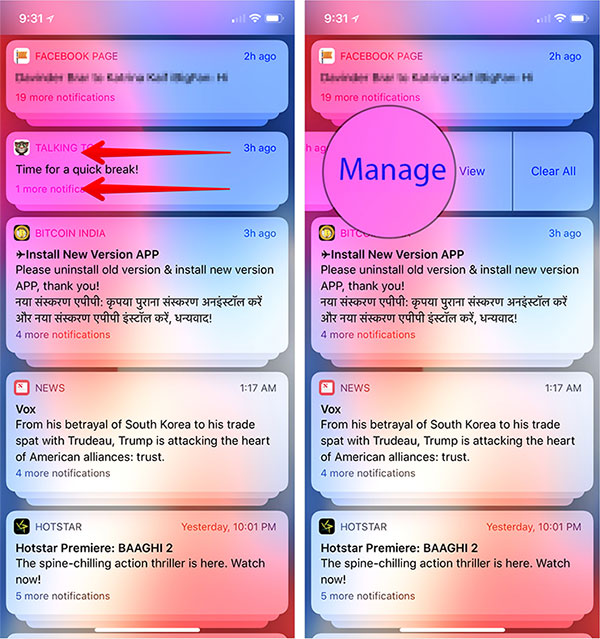
# 1. Call Notification Center on your iOS device.
Step # 2. Now, Swipe to the left on an alert and press "Manage".
 Swipe left on Notification and press Manage
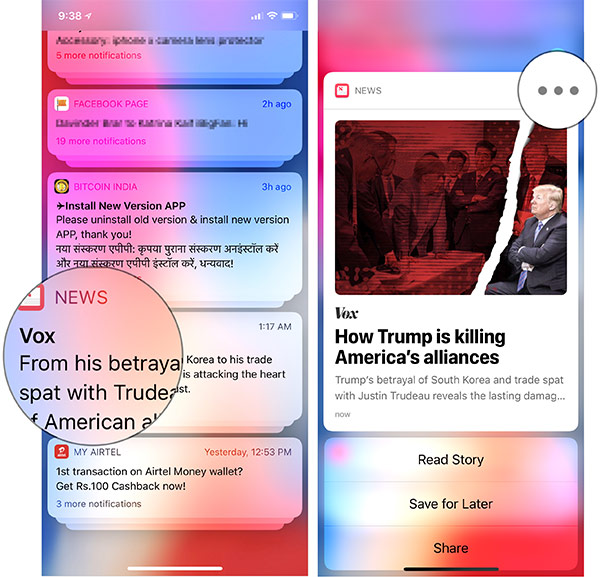
Alternatively, you can press and hold an alert → press ellipses (•••)
 on Notification and tap three points on the iPhone
Step # 3. Then a menu will appear on the screen.
Now you have two options:
Deliver quietly: It will pass the alerts from the lock screen and directly go to the notification center. In addition, you will not hear any sound or vibration. But the badge of the application will continue to display
Disable: It allows you to completely disable the notifications of the application.
 Options to change iPhone lock screen notification settings
Hint: Anytime you want the alert to arrive on LS in its own right, go to the notification of the application and slide your finger on it. Then tap "Manage" and select "Deliver Prominently".
 Change Notification Settings from iOS Lock Screen 12

Change Notification Settings

Gihosoft iPhone Data Recovery is a professional iPhone Data Recovery software to get back all your lost text message, photo, video, call history, note, contact and more from iPhone/iPad/iPod Touch. It offers a full solution to recover your lost data in different tough situations. Besides recovering data directly from iPhone, iPad and iPod touch, it also allows you to recover data from iCloud and iTunes backup files.

Friday, 15 June 2018

How to Start a FaceTime Group Call on iPhone and iPad


How to Start a FaceTime Group Call on iPhone and iPad

Step # 1. Launch FaceTime on your iOS device.
Step # 2. Now, tap "+" in the upper right corner. Then you must enter the name or number of the person you want to call
You can now add up to 30 additional contacts. So, do not miss to include those with whom you still love to have a long conversation.
Step # 3. Finally, press Video or Audio to start a call
 Make a FaceTime group call on iPhone
Once you're done, press red button "X" to end the call as usual.
 End Call FaceTime Group on iPhone
You will also be able to make a FaceTime call from the Messages application. It's just as simple.

How to Start a FaceTime Call in Group Using Messages on iPhone and iPad

Step # 1. Launch the Messages application on your iOS device, then select a group conversation .
Step # 2. Now you have to press the group name at the top center.
Step # 3. Then press Icon FaceTime
 Make a FaceTime call in a group from iMessage on iPhone or iPad

Join Group FaceTime Calls

Group participants can take part in the call with ease.Gihosoft iPhone Data Recovery is a professional iPhone Data Recovery software to get back all your lost text message, photo, video, call history, note, contact and more from iPhone/iPad/iPod Touch. It offers a full solution to recover your lost data in different tough situations. Besides recovering data directly from iPhone, iPad and iPod touch, it also allows you to recover data from iCloud and iTunes backup files.


Wednesday, 13 June 2018

The Best Solution for iTunes Error 11


As mentioned above, there could be a number of reasons why iTunes error 11 occurs. So you should try fixing them one by one until the problem is solved. Here are the solutions you can try:

1. Update iTunes

Error 11 may occur if you are using an outdated version of iTunes. So it is recommended that you update iTunes to the latest version. Follow these instructions:
Step 1: Open iTunes on your computer.
Step 2: Navigate to Help > Check for Updates. Then follow the on-screen instructions to update iTunes.
Step 3: Alternatively, you can uninstall iTunes completely and then download the latest version of iTunes from Apple’s official website and install it by following the on-screen instructions.
Transfer-Videos-with-Dropbox.png

2. Disable Antivirus

Sometimes iTunes may not work properly due to conflict with other programs, particularly antivirus software. So it would be good idea to disable your antivirus temporarily to see if it fixes iTunes error 11. The process to disable antivirus depends on which antivirus software you use on your computer. Regardless of which antivirus software it may be, it won’t take more than a few clicks to disable it. Once you have disabled it, open iTunes and check whether the error 11 still exists.

3. Check Port and Battery

The problem can also occur if your computer’s USB port or the battery connection is damaged. It is recommended that you inspect them carefully and check whether they are both okay. You should also disconnect and then reconnect the battery if you have the proper tools.

4. Unplug Unnecessary USB Cables

Your computer may be having trouble communicating with all the connected devices if there are more than one USB devices connected to it. So you should unplug the unnecessary USB cables before opening iTunes. It may or may not fix the problem, but it is worth a try.
Sponsor Ads:
Gihosoft iPhone Data Recovery is a professional iPhone Data Recovery software to get back all your lost text message, photo, video, call history, note, contact and more from iPhone/iPad/iPod Touch. It offers a full solution to recover your lost data in different tough situations. Besides recovering data directly from iPhone, iPad and iPod touch, it also allows you to recover data from iCloud and iTunes backup files.

Download iOS 13.1.3 and iPadOS 13.1.3 for iPhone and iPad

Apple has released iOS 13.1.3 and iPadOS 13.1.3. The previous iOS and iPadOS versions were released last month. The iOS 13.1.3 and iPadOS 13...